Moderation
Reports and sanctions go through Epic Online Services, so they cover players on every platform. Both need a crossplay login, and the client policy in the Epic Developer Portal must allow Reports and Sanctions.
Reporting players
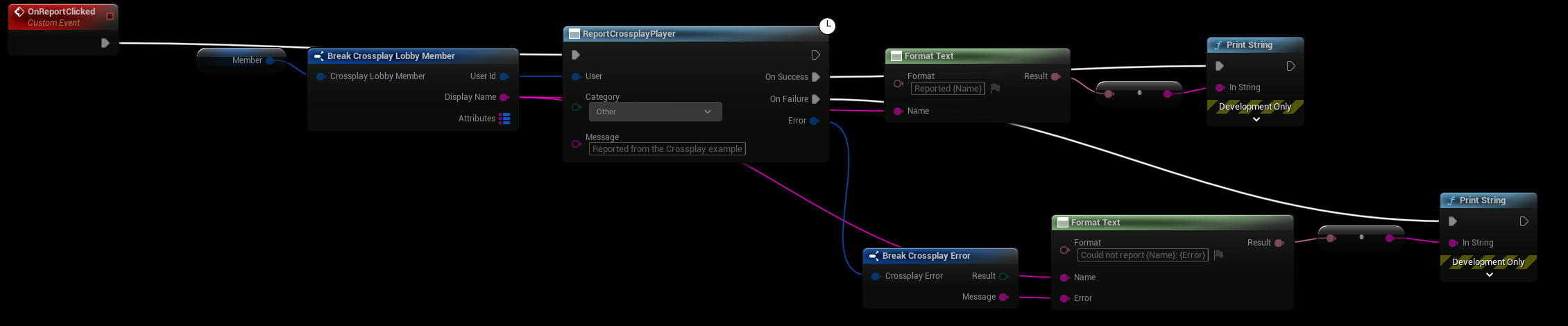
ReportCrossplayPlayer sends a player behavior report to Epic Online Services, for players on every platform. You read the reports in the Epic Developer Portal.
| Input | Description |
|---|---|
| User | The player to report, for example a lobby member or a recent player. |
| Category | Cheating, Exploiting, Offensive Profile, Verbal Abuse, Scamming, Spamming or Other. |
| Message | Optional text for the report. Cut to 512 bytes. |
- Needs a crossplay login. Without one the node fails with Not Logged In.
- A user without a Product User Id, for example a Steam friend, is looked up first. A player who has never logged in to the game with crossplay gives Not Found.
- The player can't report themselves (Invalid Parameters).
- The client policy in the Developer Portal must allow Reports.
The example's member row has a Report button:
Sanctions
Sanctions are placed on players in the Epic Developer Portal or by your backend, for example a ban from matchmaking after reports.
The local player
With Query Sanctions On Login on (the default), the plugin fetches the player's active sanctions right after Crossplay Login:
- Get Local Sanctions returns them.
- On Sanctions Updated fires on the subsystem when they have arrived.
List the sanction actions that should keep a player out of lobbies in Lobby Blocking Sanctions, under
Project Settings → Plugins → Crossplay → Moderation, for example RESTRICT_MATCHMAKING. A player with an active
sanction in that list can't create, join or quick match: the nodes fail with Sanctioned, and the message says
until when. The sanctions are fetched after login, so a player can create a lobby before the answer arrives.
Other players
QueryCrossplaySanctions returns the active sanctions of any player, for example to warn about a lobby member. Leave User empty for the local player. A user without a Product User Id is looked up first.
Each Crossplay Sanction has:
| Field | Description |
|---|---|
| Action | The sanction's action, as set in the Developer Portal. |
| Reference Id | The id of the sanction. |
| Time Placed | When the sanction was placed. |
| Time Expires | When it ends. |
| Permanent | True when it never ends. |