Tutorial 2: Host a lobby
The host creates a lobby that other players can find and join. The lobby carries attributes, typed key/value pairs that searches can filter on.
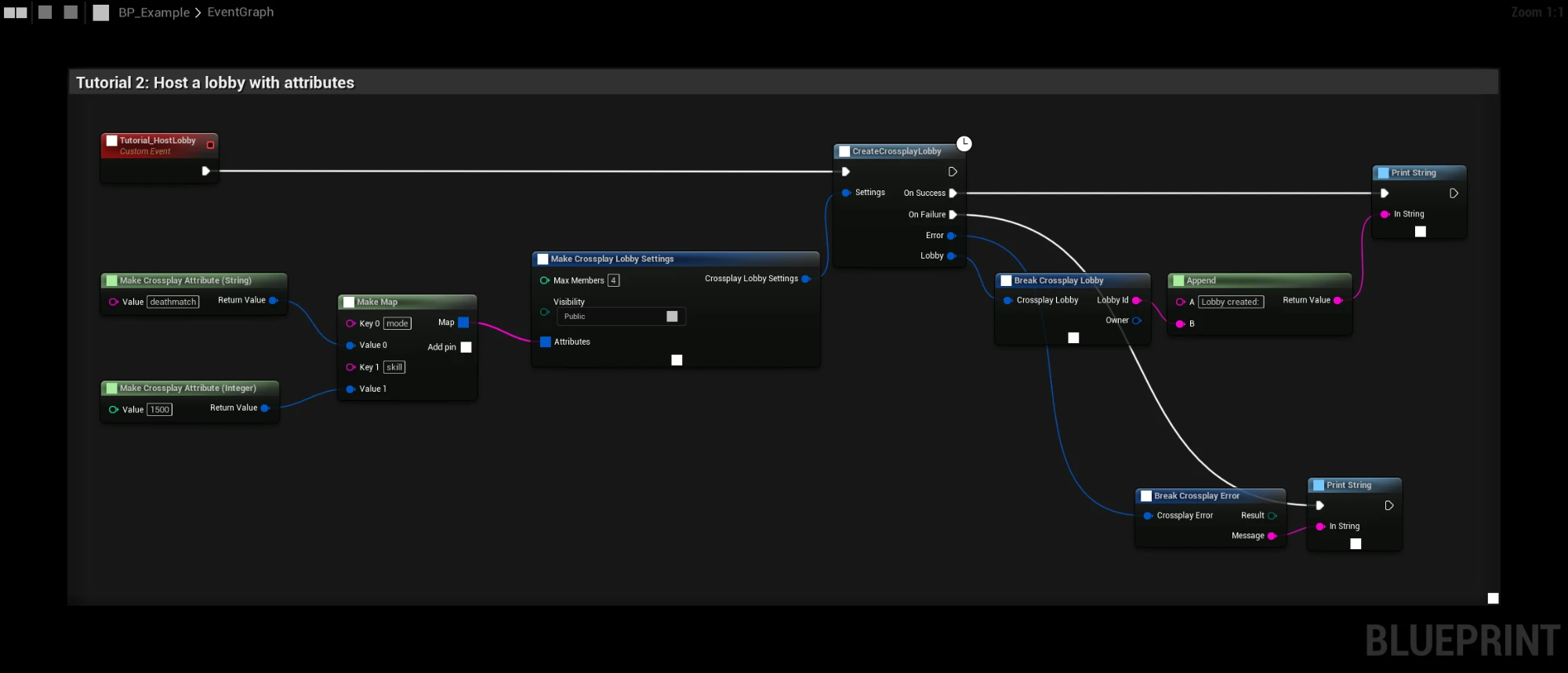
The graph
-
Make Crossplay Attribute (String) and Make Crossplay Attribute (Integer) create two typed values: the game mode
"deathmatch"and the skill1500. -
Make Map puts them under the keys
modeandskill. -
Make Crossplay Lobby Settings describes the lobby:
Pin Value Description Max Members 41 to 64 players. Visibility PublicPublic lobbies are found by searches. Bucket defaultSearches only find lobbies in the same bucket. Attributes The map Searchable lobby attributes. Voice Chat trueMembers join the lobby's voice chat. -
CreateCrossplayLobby creates the lobby and makes the player its owner. On Success gives the new Lobby. Its Lobby Id is printed here.
The player must be logged in (Tutorial 1) and must not already be in a lobby. Otherwise On Failure fires with Not Logged In or Invalid Parameters.
The type of an attribute matters. A lobby that stores skill as an Integer is only found by an Integer filter on
skill. See Attributes.
Things to try
- Use the Bucket for things that must never mix, such as the build version or region.
- Change Visibility to Invite Only and invite players instead (Invites).
- Change attributes later with SetCrossplayLobbyAttributes, for example the current map.
Next: Find and join a lobby