Login
Crossplay Login logs the player in and returns their Crossplay User Id. The player only has to be logged in once per game session. Calling it while a login is running waits for that login, and calling it when logged in returns at once.
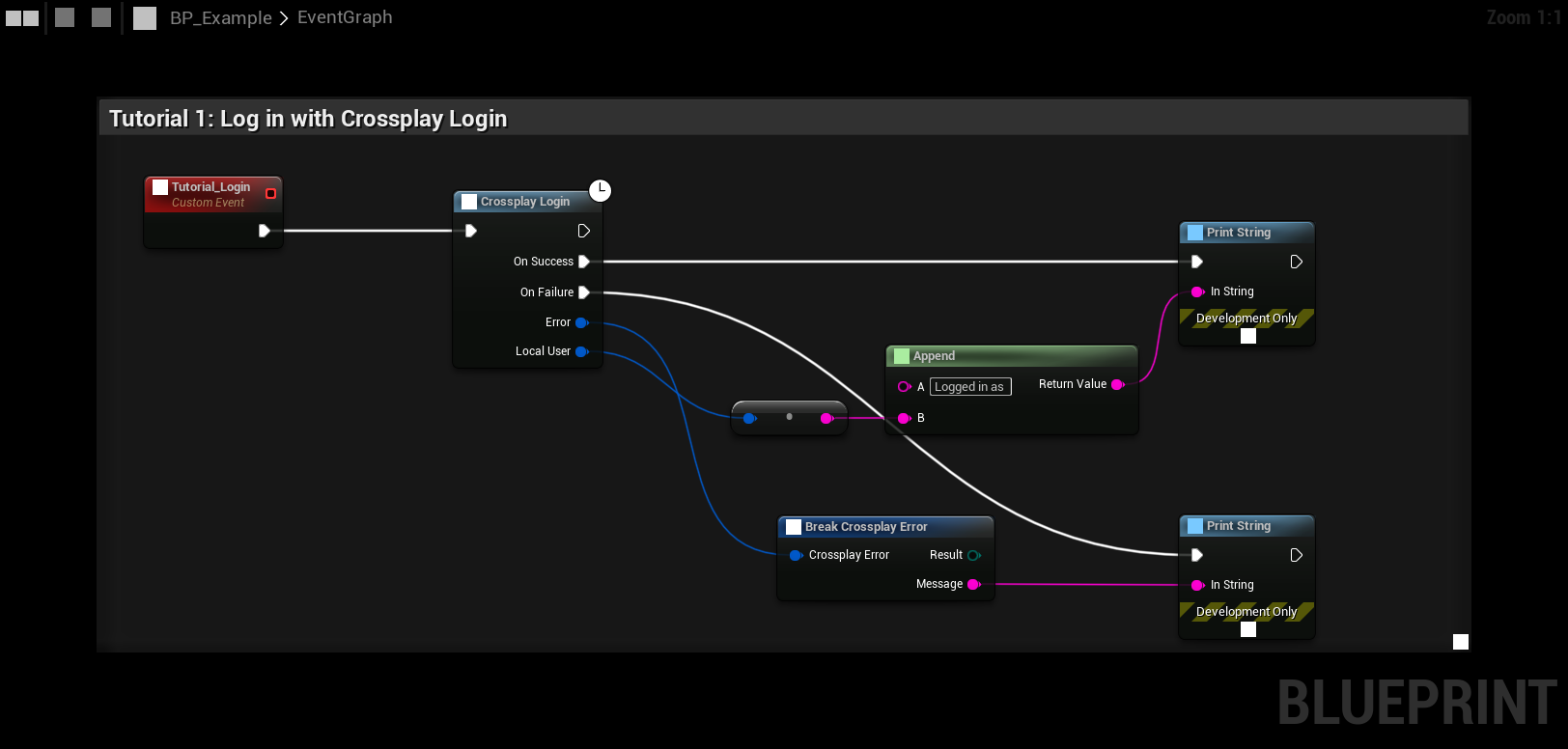
Which login is used
The plugin picks the first login that applies:
| # | Login | When |
|---|---|---|
| 1 | Dev Auth Tool | -CrossplayDevAuth=<name> on the command line and Use Dev Auth Tool on. Not in Shipping. |
| 2 | Epic account (launcher) | The Epic Games Launcher started the game, and Epic Account Login is not Never. |
| 3 | Epic account (saved login, portal) | Epic Account Login is Always, Steam is not running and Dev Auth is off. |
| 4 | Steam | Steam is running. Steam session ticket → EOS Connect. |
| 5 | Dev Auth Tool | Use Dev Auth Tool on. The credential comes from the PIE instance. Not in Shipping. |
| 6 | Device ID | Allow Device Id Login on. Anonymous EOS login for this computer. |
| 7 | Steam only | Steam is running but EOS is not available. The player has no Product User Id, and lobbies are Steam lobbies. |
If none applies, the login fails with Not Supported.
When the EOS login fails
When Steam is running but EOS rejects the Steam login, for example with Spacewar (480) or when the Steam App ID is
not set up in the Steam identity provider, the plugin logs in with a Device ID instead, as long as
Allow Device Id Login is on (the default). The player keeps their Steam name and gets a working crossplay login,
as a Device ID player. The log shows
The crossplay service rejected the platform login (...), logging in with a Device Id.
With Allow Device Id Login off, Crossplay Login returns the error and the status is Logged Out. The player keeps their Steam user (Get Local User has their Steam id), and what only needs Steam keeps working:
- Steam lobbies, Steam invites and join requests,
- matches over Steam P2P, with the Steam id as the player id,
- voice in the match and host migration.
Crossplay lobbies, EOS lobby voice, Epic friends and players from other platforms need a working EOS login. Calling Crossplay Login again tries EOS again.
On Login Status Changed fires on the subsystem when the status changes between Logged Out, Logging In and Logged In. Read the current status with Get Login Status, the player with Get Local User and their name with Get Local Display Name.
Steam
The Steam backend asks Steam for a Web API ticket and logs in to EOS Connect with it. The first time a Steam account logs in, a Product User is created for it. The display name is the Steam persona name. See Steam setup.
Epic accounts
Project Settings → Plugins → Crossplay → Login → Epic Account Login decides when players log in with their Epic account (EOS Auth, then EOS Connect with the Epic ID token):
| Value | Description |
|---|---|
| Never | Epic accounts are not used. |
| Launcher Only (default) | When the Epic Games Launcher starts the game. The launcher passes -AUTH_TYPE=exchangecode -AUTH_PASSWORD=<code>, and that login wins over Steam. |
| Always | Also without the launcher, when Steam is not running. The plugin first tries the login saved from the last session, then opens the Epic account portal so the player can sign in. |
The player's display name comes from their Epic account. A saved login that Epic no longer accepts is removed, but not when the login failed because there was no network.
A player logged in with an Epic account gets their Epic friends and presence, even when Steam is running. See Friends and presence.
The Developer Portal needs Epic Games as an identity provider for EOS Connect, and the client policy must allow the scopes Basic Profile, Friends List and Presence. See EOS setup.
Players started from Steam
With Epic Account From Steam set, players started from Steam are logged in to the Epic account linked to their Steam account. The setting is under Project Settings → Plugins → Crossplay - Epic Online Services → Epic Account:
- Never (default): Steam players have no Epic account.
- If Linked: players whose Steam account is linked to an Epic account are logged in to it. Nobody is asked to link.
- Ask To Link: like If Linked, and players whose accounts are not linked are shown the Epic account portal to link them. Players who cancel keep playing with Steam only, and are asked again next start.
The Epic login then gives the same crossplay player, Epic friends, presence and Epic overlay as the launcher. It needs Steam as an identity provider for Epic Account Services in the Developer Portal.
Scopes
A game that does not use Epic friends or Epic presence can turn off Request Friends Scope or Request Presence Scope under Project Settings → Plugins → Crossplay - Epic Online Services → Epic Account. The login then only asks for the scopes that are left on, and the client policy only needs those.
- With Friends off, QueryCrossplayFriends returns Not Supported for Epic accounts.
- With Presence off, SetCrossplayPresence returns Not Supported, friends come without presence, and lobbies are not tied to the Epic presence.
If the Epic login page says the client is not allowed a scope (for example friends_list), either allow it in the
client policy or turn the scope off here.
Device ID
Without Steam, or when EOS rejects the Steam login, Allow Device Id Login (on by default) logs in to EOS anonymously. The display name is Device Id Display Name, or the computer's name when that is empty.
A device id belongs to the computer, so every game on one computer gets the same Product User Id. Use the Dev Auth Tool to test several players on one computer.
Staying logged in
EOS Connect logins expire. The plugin renews the login by itself before it does, from Steam or from the Epic session. If EOS logs the player out, the status goes to Logged Out and On Login Status Changed fires.
Call Crossplay Logout on the subsystem to log out yourself, for example before logging in with another account. A logout also cancels a login or a lobby request that is still in progress, and that call returns Canceled.