Blueprint Tutorials
Tutorial 1: Log in
Every other node needs a logged in player, so this is the first thing your game does. Crossplay Login logs in to the platform (Steam) and then to the crossplay service (EOS) with the same account.
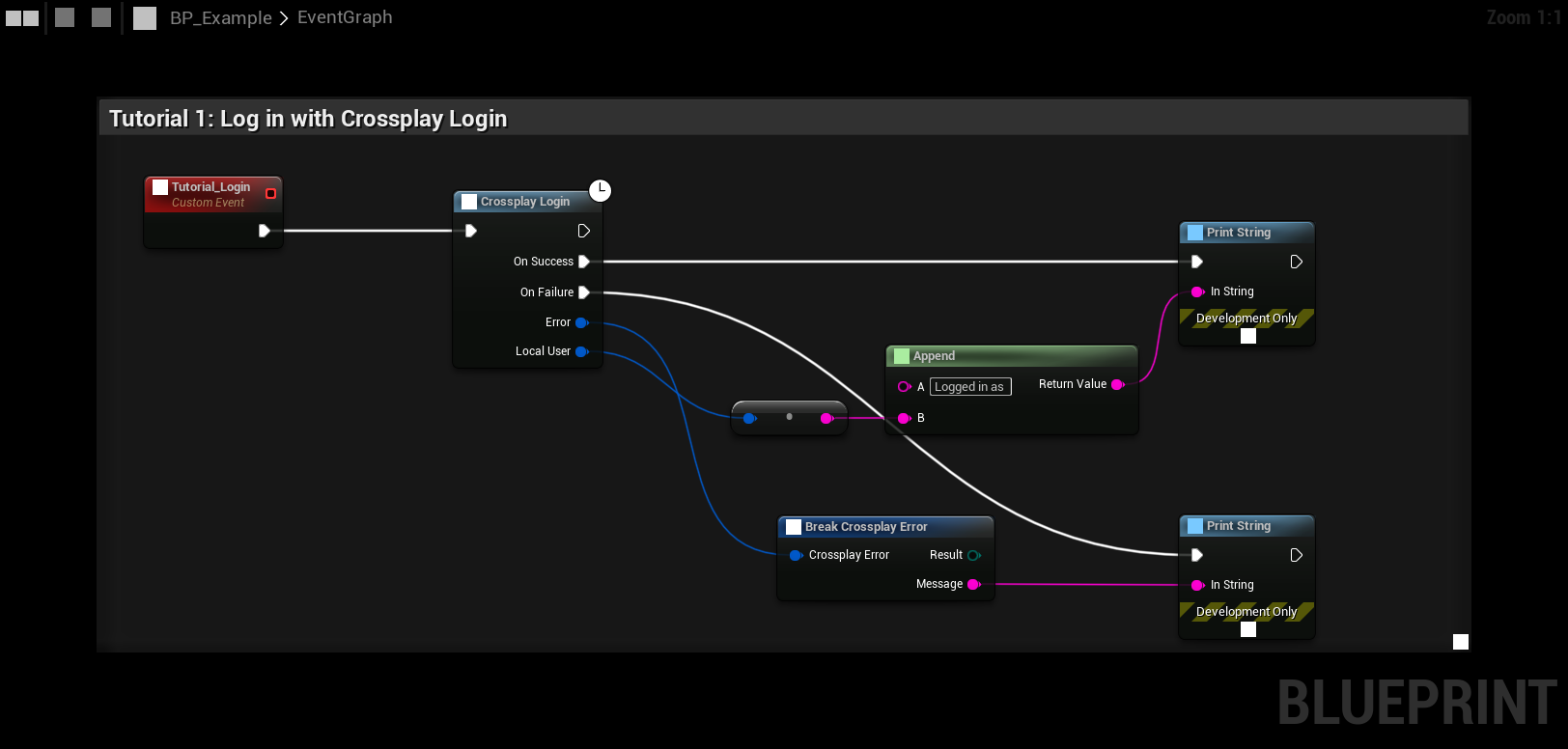
The graph
- Tutorial_Login is a custom event. Call it once, for example from Event Init in your GameInstance or from the main menu's BeginPlay.
- Crossplay Login starts the login. Its top exec pin continues at once. On Success and On Failure fire when the login is done.
- On Success gives the Local User, a Crossplay User Id. Plug it into a string pin and it converts by itself (To String (Crossplay User Id)).
- On Failure gives a Crossplay Error. Break it and print the Message.
Calling Crossplay Login again while logged in returns at once with the same user, so it is safe to call it from every menu that needs it.
Things to try
- Use Get Local Display Name on the Crossplay Subsystem to greet the player by name.
- Use Get Login Status, or bind On Login Status Changed, to show a "Logging in..." state in your UI.
- Switch on the error's Result (for example Not Logged In or Not Supported) to show your own messages.
See Login for Epic accounts, Device ID logins and the login settings.
Next: Host a lobby