Tutorial 3: Find and join a lobby
Other players search for the lobby from Tutorial 2 with filters and join the first match. This is a simple "quick match" button.
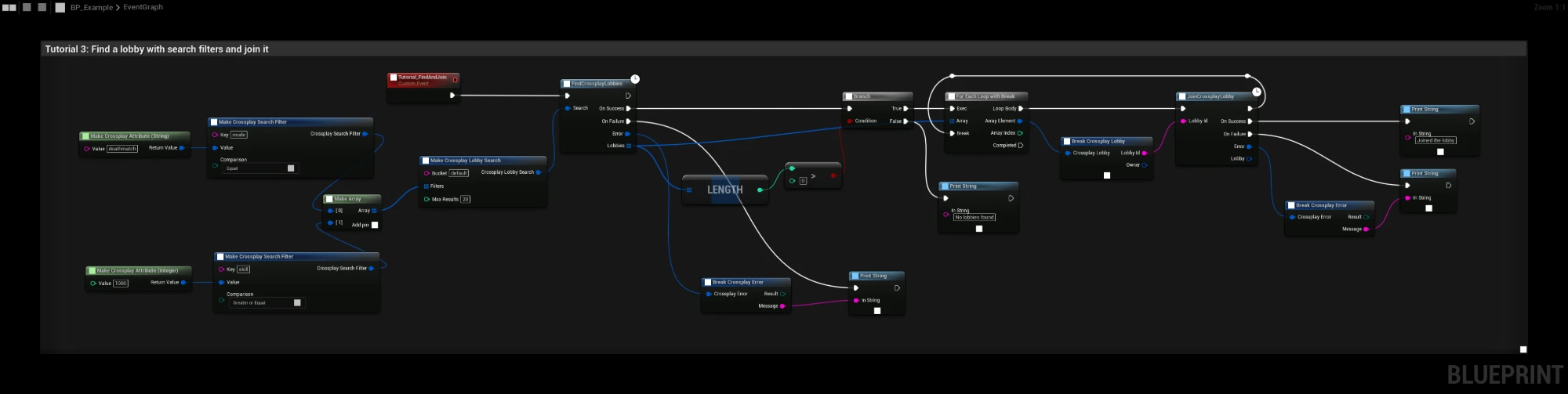
The graph
-
Two Make Crossplay Search Filter nodes describe what to look for:
Key Comparison Value modeEqual "deathmatch"(String)skillGreater Or Equal 1000(Integer) -
Make Array collects the filters, and Make Crossplay Lobby Search adds the Bucket (
default, the same as the host) and Max Results (20). -
FindCrossplayLobbies runs the search. On Success gives the Lobbies that matched, best first.
-
Length > 0 checks that something was found. If not, the graph prints "No lobbies found".
-
For Each Loop with Break goes through the results. JoinCrossplayLobby is called with the first lobby's Lobby Id, and its top exec pin goes to Break, so only one join is started.
-
JoinCrossplayLobby fires On Success with the joined lobby, or On Failure, for example with Lobby Full when someone else took the last place.
Both players must use the same Bucket. If the search finds nothing, check that the bucket, the filter types and the host's attributes match.
Things to try
- Show the results in a list instead of joining the first one. Each Crossplay Lobby has Num Members, Max Members and the Attributes to show in a row.
- When nothing is found, create a lobby instead (Tutorial 2). That is a complete matchmaking loop.
- JoinCrossplayLobby also takes Lobby Ids from invites and join requests (Invites).
Next: React to lobby events